
Showing posts with label technology. Show all posts
Showing posts with label technology. Show all posts
Sep 15, 2010
Hurry Up and Wait


Jul 23, 2010
Reviewing Vectorworks Landmark 2010 - Part One
 |
| ©Nemetschek NNA |
In this first installment, I'll look at the most basic basics of working with Vectorworks Landmark 2010: setting up documents, organizing your work, and drafting basic 2D forms.
The primary reason I began working with Vectorworks Landmark (which I'll call VW) five years ago was that it was the most robust CAD program available for the Mac, and this hasn't changed. The industry standard, AutoCAD, still isn't Mac-compatible; but VW can both read from and write to DWG/DXF formats, and VW2010 has only expanded this compatibility. For some designers, this is reason enough to use VW: it has the power of AutoCAD, with the friendliness of Mac. Actually, the only AutoCAD feature I really miss in VW is the ability to define block attributes, to create editable text templates. (If you don't know what I'm talking about, you probably won't mind the omission.)
Since it has such strong roots in the Mac's graphical interface, using VW has always been very intuitive for me. Open up a new document, and almost immediately it's obvious how to begin drafting. Tools can be selected either from graphical palettes which can be "torn off" and placed anywhere on the screen, or by customizable key commands. Better still, your entire working environment can be customized -- including which tools appear on which palettes, how your cursor behaves, default line weights, and so on. In fact, there are so many ways to customize your workspace, VW has had a hard time consolidating preferences. As a result, it's hard to keep track of what lives where: dashed-line styles are in the File>Document Settings menu, while line weights are in the Tools>Options>Line Thickness menu. Cursor appearance is controlled from either the Vectorworks>Preferences menu or the Tools>Options>Vectorworks Preferences menu; but cursor behavior — e.g. snapping to endpoints, constraining to angles, showing extension lines from reference points — is in the Tools>Options>SmartCursor Settings menu. I love being able to hack almost every aspect of the program, but I'd also love to see these controls organized more logically.
 |
| Save time: select like objects at once. |
It probably is most efficient to begin from a template document including your customized workspace, key commands, style standards, frequently used plant and other symbols, object classes, and sheet and design layers. In practice, though, I usually wind up starting with an existing client file and doing a "Save As…" to make a new document. Sometimes this results in strange behaviors, such as broken resource links, and VW makes it very easy to renew the link, change it, or delete the resource entirely. One of my favorite new features is the "Select Similar" tool, which allows me to select objects of like size, shape, color, line weight, opacity… any combination of 27 different criteria in all. This is a massive time-saver when I want to, say, delete all the boulders in a design, or increase the line weights of all my trees, or make all the guidelines on one particular design layer visible.
Speaking of design layers, if you're an AutoCAD user you might not be sure what I'm talking about: you're accustomed to drafting mostly in "model space," producing sheets in "paper space," and assigning objects to "layers" with unique attributes and visibilities. Be forewarned that VW uses a different (and, to my mind, more accurate) parlance to organize your work: drafting happens mostly in "design layers," sheet production happens in "sheet layers," and objects are assigned to unique "classes." Like AutoCAD, though, VW does use "viewports," and has the ability to reference external drawings (even though VW doesn't call it XREF). I do know designers who do all their VW drafting to scale on sheet layers; I truly don't understand this, as VW allows so much more flexibility when you commit to using design layers, classes and viewports (plus, the learning curve to master them is so blessedly short). Best of all, VW makes it easy to save sets of classes and layers as defaults, so your trusty favorites are right there whenever you start a new document. I won't go into detail here on how I structure layers and classes in my files, except to say that I like to parse them as finely as possible for maximum control over the appearance of my plans. If you'd like to know more, feel free to write me.
 |
| Organizing with layers & classes makes presentation infinitely easier. |
 |
| ©Nemetschek NNA |
Someone wrote that AutoCAD basically draws lines, while VW basically draws shapes. It's a convenient distinction, and anyone familiar with Google SketchUp will know how much faster it can be to define a rectangle than to draw four lines at right angles. VW now provides four ways to draw a rectangle; six ways to draw a circle; two oval modes; regular and irregular polygons; polylines; spirals; and even freehand lines with varying degrees of smoothness. Again, any of these can be decomposed into segments and edited, or converted to objects, or spliced together or intersected to make complex forms. I have yet to hand-draft a line or shape that I couldn't replicate in VW — however, as with most digital tools, this demands a fair investment of time, so it's usually not appropriate in the early stages of design. The new version offers a plethora of "smart" drafting aids, such as snapping to points, edges, vertices and predefined angles; zooming into the spot you're drafting; and varying degrees of visual cues such as highlighting snapped objects and available points. Again, these aids are customizable to a fault, and I found them useful when I was getting to know the program but now have them disabled to reduce the "visual noise" in my workspace.
In my next post I'll explore the more landscape-relevant features of VW Landmark 2010, including dimensions, plant libraries and symbols. In the meantime, if your appetite is whet I would recommend diving into (a) the Vectorworks website, for descriptions and demonstration videos; (b) the Vectorworks user board and/or the VectorWorking community, which contain lots of tips as well as insights into what problems people are having; and (c) the undisputed champion of Vectorworks third-party support, Jonathan Pickup and his Archoncad site. And as always, if you have questions or corrections on what I've written here, please give me an earful.
Oct 27, 2008
Getting the Picture
One of the most important aspects of my work isn't a knowledge of plants, or construction techniques, or materials costs: it's communication. After all, if my clientele or my contractors can't understand what I have in mind, then my horticultural prowess doesn't matter much.
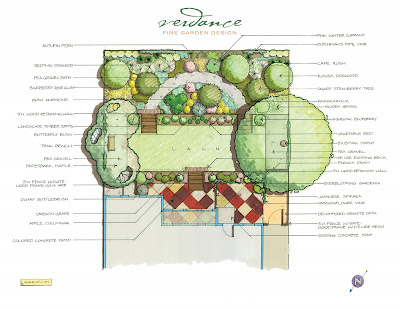 A hand-drafted design conceptTo translate my vision, I rely on clear, detailed design plans. There are any number of ways to create plans, from quick sketches to detailed hand-drafting to the precision of computer-aided design (CAD), and every designer has their favorite set of planning tools.
For better or worse, recent years have seen a burgeoning of "do-it-yourself" garden design software; it's aimed at homeowners, but some landscape designers and contractors use these programs as well to streamline their processes. On the other end of the spectrum are high-powered CAD programs such as AutoCAD and VectorWorks, which can lay out a semiconductor chip or a 200-story office tower as handily as a flagstone patio. And somewhere in between are apps like Google SketchUp, powerful enough for pros to rely on but easy enough for almost anyone to learn and use at some level.
 SketchUp and hand-sketching over a photo
In my studio, I find the clearest way to communicate my ideas is with a suite of SketchUp, VectorWorks and hand-drafting. I do love me some tech: VectorWorks lets me precisely plot site dimensions, features and structures, and quickly calculate areas and quantities, while SketchUp helps me reality-check my ideas, often helping me recognize their impracticality (or impossibility) before I get too wedded to them.
But there's a dark side to all this power and convenience: we can easily become dependent on it, and begin to design within its limitations. In other words, we might have a great idea — but if we don't know how to execute it with AutoCAD, that idea never makes it to the design. Or if we persist, and invest the time to learn how to execute that idea with AutoCAD, we have less time to explore other, possibly better ideas. Drafting by hand gives me the speed and flexibility to churn out a dozen very different concepts in a day if necessary; even in a program as friendly as SketchUp, such dexterity is virtually impossible.
The ASLA has recently published a piece on what technology can do for landscape architects. It's an interesting read from an insider's point of view. And, it doesn't miss the bigger picture: that there are some things technology just can't do.
 A hand-drafted design conceptTo translate my vision, I rely on clear, detailed design plans. There are any number of ways to create plans, from quick sketches to detailed hand-drafting to the precision of computer-aided design (CAD), and every designer has their favorite set of planning tools.
 For better or worse, recent years have seen a burgeoning of "do-it-yourself" garden design software; it's aimed at homeowners, but some landscape designers and contractors use these programs as well to streamline their processes. On the other end of the spectrum are high-powered CAD programs such as AutoCAD and VectorWorks, which can lay out a semiconductor chip or a 200-story office tower as handily as a flagstone patio. And somewhere in between are apps like Google SketchUp, powerful enough for pros to rely on but easy enough for almost anyone to learn and use at some level.
 SketchUp and hand-sketching over a photo
In my studio, I find the clearest way to communicate my ideas is with a suite of SketchUp, VectorWorks and hand-drafting. I do love me some tech: VectorWorks lets me precisely plot site dimensions, features and structures, and quickly calculate areas and quantities, while SketchUp helps me reality-check my ideas, often helping me recognize their impracticality (or impossibility) before I get too wedded to them.
But there's a dark side to all this power and convenience: we can easily become dependent on it, and begin to design within its limitations. In other words, we might have a great idea — but if we don't know how to execute it with AutoCAD, that idea never makes it to the design. Or if we persist, and invest the time to learn how to execute that idea with AutoCAD, we have less time to explore other, possibly better ideas. Drafting by hand gives me the speed and flexibility to churn out a dozen very different concepts in a day if necessary; even in a program as friendly as SketchUp, such dexterity is virtually impossible.
The ASLA has recently published a piece on what technology can do for landscape architects. It's an interesting read from an insider's point of view. And, it doesn't miss the bigger picture: that there are some things technology just can't do.
Sep 26, 2008
Live from West Coast Green
Anyone remotely connected with anything remotely connected to green building is at the West Coast Green conference and showcase this weekend in San Jose. In case you can't be there in person — or, even if you can, in case you can't be everywhere at once there — you have an intrepid proxy in Green To-Do, who is live-blogging from the conference with their usual panache. Check it out, one way or another, and let me know what you think!
Apr 12, 2008
Green Building Comes Home
 If you're planning a construction project here in Palo Alto later this year, odds are you're going to be held to a higher standard than ever. As reported in the Palo Alto Weekly, a proposed building ordinance will require that residential construction ultimately comply with the "GreenPoint Rated" checklist developed by California's Build It Green initiative; and that commercial projects meet national LEED standards.
 On the home front, here are some of the items Build It Green includes on their landscaping checklist:
The proposed ordinance is likely to take effect in July, with a phased implementation (e.g. home builders will only have to earn 75% of the necessary points within the first two years) to allow time to master the new requirements. But whether you're a local homeowner, a builder or a contractor working in Palo Alto, the political landscape is about to dictate major changes to your project's landscaping. If you have questions about what's ahead, I'd be happy to be your local green guide.
Mar 31, 2008
My Favorite New Gadget
I'm on the road visiting job sites a lot, which can make keeping a schedule challenging and keeping track of my notes downright maddening. But I've recently begun using a terrific service called Jott.com, which lets me phone in and leave voice messages for myself or anyone in my Jott network — messages that then are transcribed and emailed, or posted here on my blog or another service like Twitter, or sent as a text message to my phone.
It's great for quick notes (such as a plant combination I want to remember), or timed reminders (for instance, when I set up a client meeting) to be sent at a specific date and time. What makes the service so remarkable, though, is its accuracy. Click on this image to see a transcript Jott emailed me: with absolutely no "training" to my voice patterns or cadence, Jott got this note exactly right — right down to the bullet points and question mark:

And while it isn't always perfect — remember, a lot of my job involves weird, Latin-based plant names — I've gotta give Jott props for trying. Here's another emailed transcript:

First, I'm amazed it got — and capitalized — "Hydrangea." And really: can I expect Jott to know Carpenteria, chartreuse, and variegated? Its attempts are actually kind of sweet. And at least it has the decency to tell me, "Dude, I'm just not sure on this one."
The only other thing I'm wishing for right now is the ability to integrate my camera-phone with Jott messages; perfect for when I'm at the nursery, say, and see a specimen that I want to both take a picture of and add my idea for using it. But that's OK... I can wait a little longer for that utopia.
It's great for quick notes (such as a plant combination I want to remember), or timed reminders (for instance, when I set up a client meeting) to be sent at a specific date and time. What makes the service so remarkable, though, is its accuracy. Click on this image to see a transcript Jott emailed me: with absolutely no "training" to my voice patterns or cadence, Jott got this note exactly right — right down to the bullet points and question mark:

And while it isn't always perfect — remember, a lot of my job involves weird, Latin-based plant names — I've gotta give Jott props for trying. Here's another emailed transcript:

First, I'm amazed it got — and capitalized — "Hydrangea." And really: can I expect Jott to know Carpenteria, chartreuse, and variegated? Its attempts are actually kind of sweet. And at least it has the decency to tell me, "Dude, I'm just not sure on this one."
The only other thing I'm wishing for right now is the ability to integrate my camera-phone with Jott messages; perfect for when I'm at the nursery, say, and see a specimen that I want to both take a picture of and add my idea for using it. But that's OK... I can wait a little longer for that utopia.
Feb 8, 2008
New Name, Same Story
Realizing that I tend to talk about the state of our world just as much as actual garden design, I hereby rename this blog "A Verdant Life." After all, aren't you reading this because nature makes your existence more rich and joyful? And if I do my work here well, you'll notice the wonders of the world around us just a little bit more... be inspired to make your corner of the planet just a little greener... and live a verdant life both in and out of the garden.
Sep 17, 2007
You Say Feijoa, I Say... Acca?!
 I recently learned that the pineapple guava tree, formerly known as Feijoa sellowiana, is now going by Acca sellowiana.
 This sort of re-naming, while confusing, isn't uncommon: Stipa tenuissima is now Nassella, Diosma pulchrum is now Coleonema, Atriplex spinosa is now Grayia, Laurentia fluviatilis is synonymous with Isotoma fluviatilis is synonymous with Pratia pedunculata, and so on. Which begs the question, if these supposedly sacrosanct botanical names can be so fluid, why do they matter?
 It helps to understand the difference between botanical, or "scientific," names and common, or "vernacular," ones. While common names such as "pineapple guava," "breath of heaven," and "blue star creeper" roll easily off the tongue (and offer ample opportunity for seductive descriptions in mail-order catalogs) they are imprecise, usually relying on associations not obvious to everyone. What is a "lily of the valley" to you? An herbaceous perennial, or an evergreen shrub? For some real entertainment, peruse Wikipedia's list of plants by common name: not only can you see why ordering a "white birch" could get you into trouble, but you'll also see that a brown daisy, yellow daisy, black-eyed Susan, and brown-eyed Susan are all the same plant, depending somewhat arbitrarily on where in the U.S. you live.
 Botanical names, on the other hand, are determined systematically rather than arbitrarily, and are consistent throughout the world. Every species has one, and only one, botanical name; and that name describes not only its unique characteristics but also its relation to other species. This system was developed by the premier 18th-century naturalist Carl Linnaeus, who classified all living things hierarchically by their common characteristics rather than, say, geographic origin. In botany, we are usually most concerned with the genus and species names; less frequently with the larger family or the smaller subspecies and/or varietal names. So our old favorite the black-eyed Susan can most accurately be described as Rudbeckia hirta — that's genus Rudbeckia, species hirta, which tells us it's related to yet different from Rudbeckia fulgida and Rudbeckia laciniata. (Now we only need to decide whether we mean the variety R. hirta var. angustifolia, or R. hirta var. pulcherrima.)
 Seems pretty straightforward, right? Well, not quite. In a future post, I'll talk a bit about the "Deep Green" project spearheaded by Brent Mishler at Berkeley, which aims to trace plants' evolutionary paths and reclassify them in a cladistic, not Linnaean, manner — meaning that the venerable Zea mays would be renamed Mays Zea Gramineae Monocots Angiosperms Eukaryota Life. Not quite as poetic, perhaps, but technically more accurate… and definitely more precise than "corn."
Jul 30, 2007
A Tree Grows At Stanford

We all know Stanford University is the pinnacle of knowledge west of the Atlantic Ocean. But while we might expect binary trees, expression trees and one particularly silly mascot, did you know the University's founder also planned a great arboretum that would be a veritable "zoo for trees," taking advantage of the region's moderate climate to grow rare and notable species from every corner of the globe?
Unfortunately, what remains in the original arboretum space planned by Frederick Law Olmsted are mostly eucalyptus and oak species as well as the palms on eponymous Palm Drive and elsewhere. The oaks are native, explicitly protected by Senator Stanford; the eucalypts were planted as fast-growing "nurse trees" to offer shade to tender exotic transplants while they established, then be removed.
As the Stanford News Service reports, in the financial crisis following the Senator's untimely death "the arboretum was neglected. Most specimen trees failed, while the heartier eucalypts flourished." When backers revived plans for the arboretum, they "upheld Stanford's vision for maintaining wooded open space, but departed from his notion of trees from around the world in favor of species native to California."
Nevertheless, today Stanford hosts a remarkable diversity of not only trees but also shrubs, vines, grasses and native plants, catalogued and annotated online in a tremendous resource. Horticultural notes, leaf silhouettes, tree walk maps, and more await you. Whether or not you've seen it on campus, this is a quick and gorgeous go-to guide for identifying, or selecting, that perfect specimen.
May 14, 2007
If I'm In The Shade, This Must Be Monday
Photo ©Chris Neale
As we approach the summer solstice, it can become difficult to design to your yard's patterns of sun and shade: more specifically, it's very easy to over-estimate just how much sun a given site receives. I've certainly planted vegetable beds in "full sun" locations this time of year, only to find them in permashade as the equinox rolls on by.
If you're only planting tomatoes or other summer annuals, such an impending lack of sunlight may not be a big deal. But if you're designing a comprehensive landscape -- and particularly if you haven't lived at the site for a full year to see the change of light and seasons first-hand -- it pays to figure out when, and where, the light will retreat.
To the rescue comes the U.S. Navy, which kindly publishes a calculator to determine the altitude (angle above horizon) and azimuth (angle east of true north) of the sun at any minute of any given day. Combined with a shadow length calculator, this data should help you determine the boundaries of your shady areas throughout the year.
Thus, if you know that you live in a 20-foot tall house in Palo Alto, CA, you can calculate that on June 21 of this year (the summer solstice), your home will cast a 5-foot deep shadow at solar noon. However, on the winter solstice six months later, that shadow will extend about 36 feet!
It's most useful to calculate shadow points for the most massive things on your property -- usually structures like houses and detached garages, but also evergreen trees, fences, and neighboring buildings -- on the two solstice and two equinox dates. If you're really persnickety, you can forecast shadows not only at high noon, but also three or four hours on either side of noon, since "full sun" plants typically want 6-8 hours of direct sunlight per day (don't forget to shift the shadow angle to the west or east appropriately).
If you map all these points onto your site plan (I find using different color pencils for the different dates helps), you can get a pretty clear picture of where to plant what (or where to site that winter sun-pocket bench). Plus, you'll have a sense of what you might need in the way of lighting or heating throughout the year, and create separately-switched circuits based on what the darkest/coldest zones will be during the times of year you plan to be outside.
I know, it's all very geeky... yet somehow strangely exciting, no?

As we approach the summer solstice, it can become difficult to design to your yard's patterns of sun and shade: more specifically, it's very easy to over-estimate just how much sun a given site receives. I've certainly planted vegetable beds in "full sun" locations this time of year, only to find them in permashade as the equinox rolls on by.
If you're only planting tomatoes or other summer annuals, such an impending lack of sunlight may not be a big deal. But if you're designing a comprehensive landscape -- and particularly if you haven't lived at the site for a full year to see the change of light and seasons first-hand -- it pays to figure out when, and where, the light will retreat.
To the rescue comes the U.S. Navy, which kindly publishes a calculator to determine the altitude (angle above horizon) and azimuth (angle east of true north) of the sun at any minute of any given day. Combined with a shadow length calculator, this data should help you determine the boundaries of your shady areas throughout the year.
Thus, if you know that you live in a 20-foot tall house in Palo Alto, CA, you can calculate that on June 21 of this year (the summer solstice), your home will cast a 5-foot deep shadow at solar noon. However, on the winter solstice six months later, that shadow will extend about 36 feet!
It's most useful to calculate shadow points for the most massive things on your property -- usually structures like houses and detached garages, but also evergreen trees, fences, and neighboring buildings -- on the two solstice and two equinox dates. If you're really persnickety, you can forecast shadows not only at high noon, but also three or four hours on either side of noon, since "full sun" plants typically want 6-8 hours of direct sunlight per day (don't forget to shift the shadow angle to the west or east appropriately).
If you map all these points onto your site plan (I find using different color pencils for the different dates helps), you can get a pretty clear picture of where to plant what (or where to site that winter sun-pocket bench). Plus, you'll have a sense of what you might need in the way of lighting or heating throughout the year, and create separately-switched circuits based on what the darkest/coldest zones will be during the times of year you plan to be outside.
I know, it's all very geeky... yet somehow strangely exciting, no?
Apr 13, 2007
Biodegradable Artificial Lawn
OK, I've got it: why not manufacture synthetic turf out of cornstarch or some other biodegradable polymer, like the packing peanuts?
Obviously you don't want it to degrade in a day, but couldn't the lifespan be about a year if just enough insoluble fiber or milk proteins or something is added? Or some marginally stable organic compound that doesn't decompose in the presence of water, but rather hydrogen peroxide? And for that matter, couldn't you imbue it with microbiology to keep some semblance of soil food web going down beneath the drain rock?
Boy, the syn-turf companies are really missing the boat on this one. Annual maintenance or infill replacement be damned -- just sign up for the scheduled annual replacement! And they wouldn't have to mess with all those 5- and 10-year warranties... I can see the marketing now: "place your order now to have your brand-new BioLawn(TM) delivered just in time for spring training!" Installation would be a cinch, just staple the new one down on top of the old.
Seriously, is plastic really the only thing we can make grass out of?
Obviously you don't want it to degrade in a day, but couldn't the lifespan be about a year if just enough insoluble fiber or milk proteins or something is added? Or some marginally stable organic compound that doesn't decompose in the presence of water, but rather hydrogen peroxide? And for that matter, couldn't you imbue it with microbiology to keep some semblance of soil food web going down beneath the drain rock?
Boy, the syn-turf companies are really missing the boat on this one. Annual maintenance or infill replacement be damned -- just sign up for the scheduled annual replacement! And they wouldn't have to mess with all those 5- and 10-year warranties... I can see the marketing now: "place your order now to have your brand-new BioLawn(TM) delivered just in time for spring training!" Installation would be a cinch, just staple the new one down on top of the old.
Seriously, is plastic really the only thing we can make grass out of?
Mar 29, 2007
Maple Syrup: Not Just for Breakfast Anymore

As reported over on TreeHugger, the sap of Acer saccharum actually might be useful in the development of biodegradable bioplastics. Not quite a sustainable solution, but perhaps a step up from petroleum-based technologies.
Plus, it goes better with pancakes.
Mar 14, 2007
A Tree Grows In San Francisco
On the heels of San Francisco's Arbor Day festivities, the City has announced its Urban Forest Mapping Project, which digitally pinpoints the location of each tree, maintains tree data in a consistent database, and offers web access to the tree data for maintenance and planting efforts.
This is no small undertaking, and because regular folks like you and I can post photos and stories about our own trees and map them online, it's a great example of how a wiki can help us live not in a collection of gardens, but in a true landscape. Thinking of planting an apple tree and wondering whether there's a pollinator nearby? Check the map. Need to know what that monster down the street is that reseeds itself so prolifically? Check the map.
The map is still in the development stages, but already it encompasses something like 140,000 trees. Check it out yourself: look up your favorite neighborhood or favorite tree... or better still, plant one yourself and add it to the database!
This is no small undertaking, and because regular folks like you and I can post photos and stories about our own trees and map them online, it's a great example of how a wiki can help us live not in a collection of gardens, but in a true landscape. Thinking of planting an apple tree and wondering whether there's a pollinator nearby? Check the map. Need to know what that monster down the street is that reseeds itself so prolifically? Check the map.
The map is still in the development stages, but already it encompasses something like 140,000 trees. Check it out yourself: look up your favorite neighborhood or favorite tree... or better still, plant one yourself and add it to the database!
Dec 29, 2006
A Bug In The System
And we thought Y2K was going to be bad. In the last 24 hours I've lost my Mac due to an illogical logic board, and now my email due to a power outage wherever those email servers serve emails. Dammit, people, I'm workinghere!
Actually, it's ironic because I've recently moved away from hand drafting and begun doing most, if not all, my work using CAD. So the project I was going to finish up this week is now sitting in the hands of an Apple Genius somewhere, who undoubtedly doesn't appreciate the intricacies of my work. And the email notification from the aforementioned Apple Genius, informing me I may have my repaired computer back? It's sitting in limbo somewhere, feeling unloved.
Technology. Now helping you waste more time than ever.
Actually, it's ironic because I've recently moved away from hand drafting and begun doing most, if not all, my work using CAD. So the project I was going to finish up this week is now sitting in the hands of an Apple Genius somewhere, who undoubtedly doesn't appreciate the intricacies of my work. And the email notification from the aforementioned Apple Genius, informing me I may have my repaired computer back? It's sitting in limbo somewhere, feeling unloved.
Technology. Now helping you waste more time than ever.
Subscribe to:
Posts (Atom)